Upgrade Subscription Plan
Last updated: February 2, 2026
HackerRank assigns the Basic plan to all users by default. You can upgrade to the Plus or Infinity subscription plan at any time. For more information on available plans, see 📄 HackerRank Subscription Plans.
When you upgrade your subscription plan:
The upgrade takes effect immediately, and you gain instant access to the features of your new subscription.
If you already have an active subscription, HackerRank calculates the charge based on proration. For the rest of the cycle, you pay only the difference between the old and new plans.
Your next billing date remains the same.
Note:
Proration formula: (Days remaining in cycle ÷ Total days in cycle) × New plan price − (Days remaining in cycle ÷ Total days in cycle) × Old plan price.
Example: Assume you are on the Plus Monthly plan ($30/month) and upgrade to the Infinity Monthly plan ($60/month) with 10 days remaining in your 30-day billing cycle.
Applying the proration formula: (10 ÷ 30) × 60 − (10 ÷ 30) × 30 = 10
You pay $10 for the upgrade.
If you upgrade from a non-Basic plan, HackerRank forfeits your previous credits. You immediately receive a full set of credits for your new subscription plan.
Note: Credits are the entitlements included in your subscription. For example, three AI Mock Interviews per month, two Mock Tests per month with detailed performance reports.
Upgrade options
The following upgrade paths are available based on your current subscription and billing cycle:
From Basic
Basic → Plus Monthly
Basic → Plus Quarterly
Basic → Infinity Monthly
Basic → Infinity Quarterly
From Plus
Plus Monthly → Plus Quarterly
Plus Monthly → Infinity Monthly
Plus Monthly → Infinity Quarterly
Plus Quarterly → Infinity Quarterly
From Infinity
Infinity Monthly → Infinity Quarterly
Upgrading subscription plan
To upgrade your subscription plan:
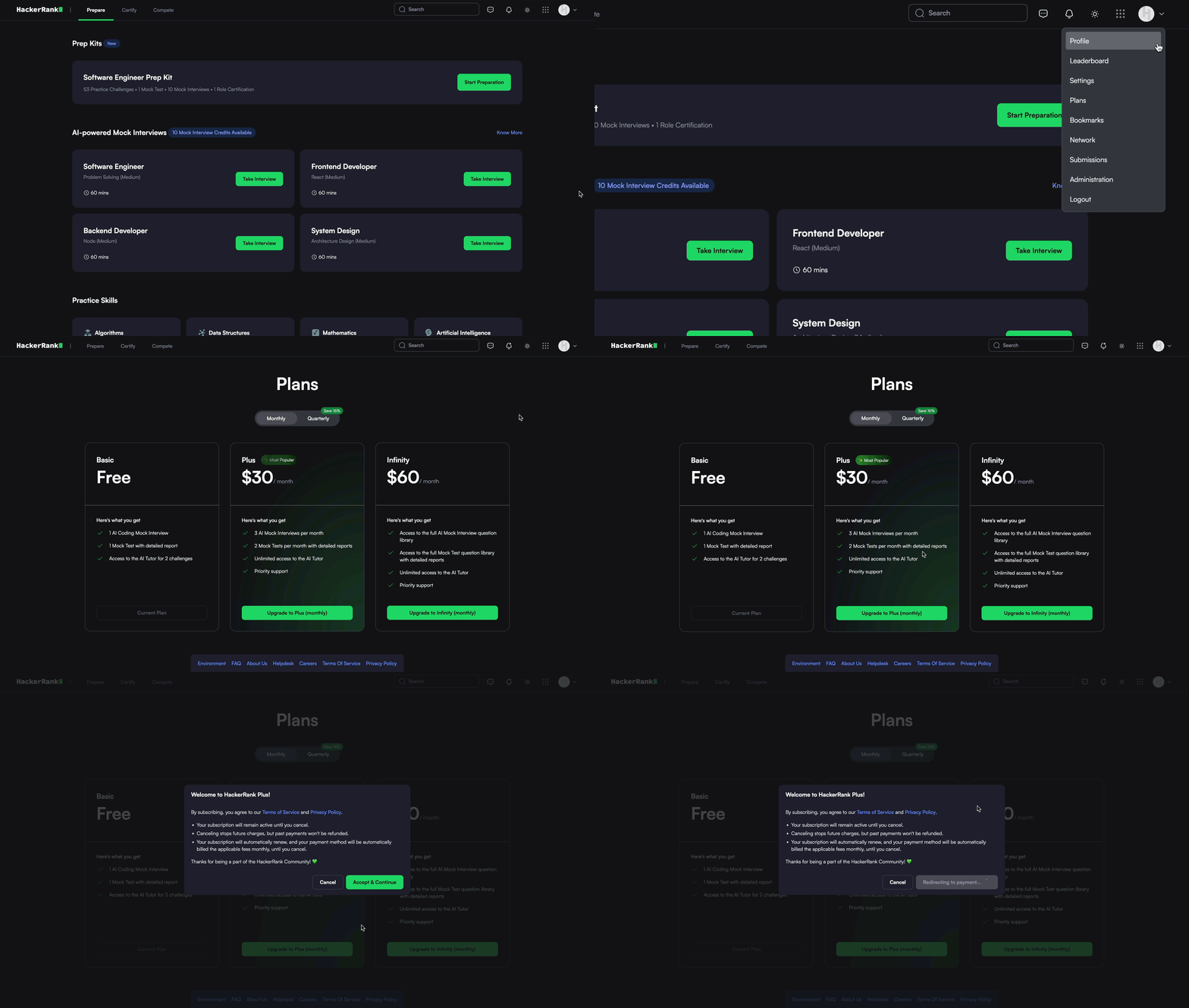
Log in to your HackerRank Community account using your credentials.
Click the profile icon in the upper-right corner.
Select Plans from the drop-down menu.
Select the plan you want and click Upgrade.
In the confirmation dialog, click Accept & Continue to proceed to the payment gateway.
Supported payment methods:Stripe (Available in all countries except India)
Razorpay (Available in India)
Enter your payment details.
Click Pay to complete your transaction.
Note: HackerRank does not issue refunds for mid-cycle upgrades.