Cancel Subscription Plan
Last updated: September 18, 2025
You can cancel your subscription at any time.
When you cancel your subscription plan:
Cancellation takes effect at the end of the current billing cycle, and you receive a confirmation email with the cancellation date.
You continue to have access to your current plan features and credits (Entitlements included in your subscription) until the cycle ends.
At the end of the cycle:
Your subscription ends, and your account reverts to the Basic plan.
Any unused credits expire.
Priority support is removed.
Cancellation options
The following cancellation paths are supported:
Infinity Quarterly → Basic
Infinity Monthly → Basic
Plus Quarterly → Basic
Plus Monthly → Basic
Cancelling subscription plan
To cancel your subscription plan:
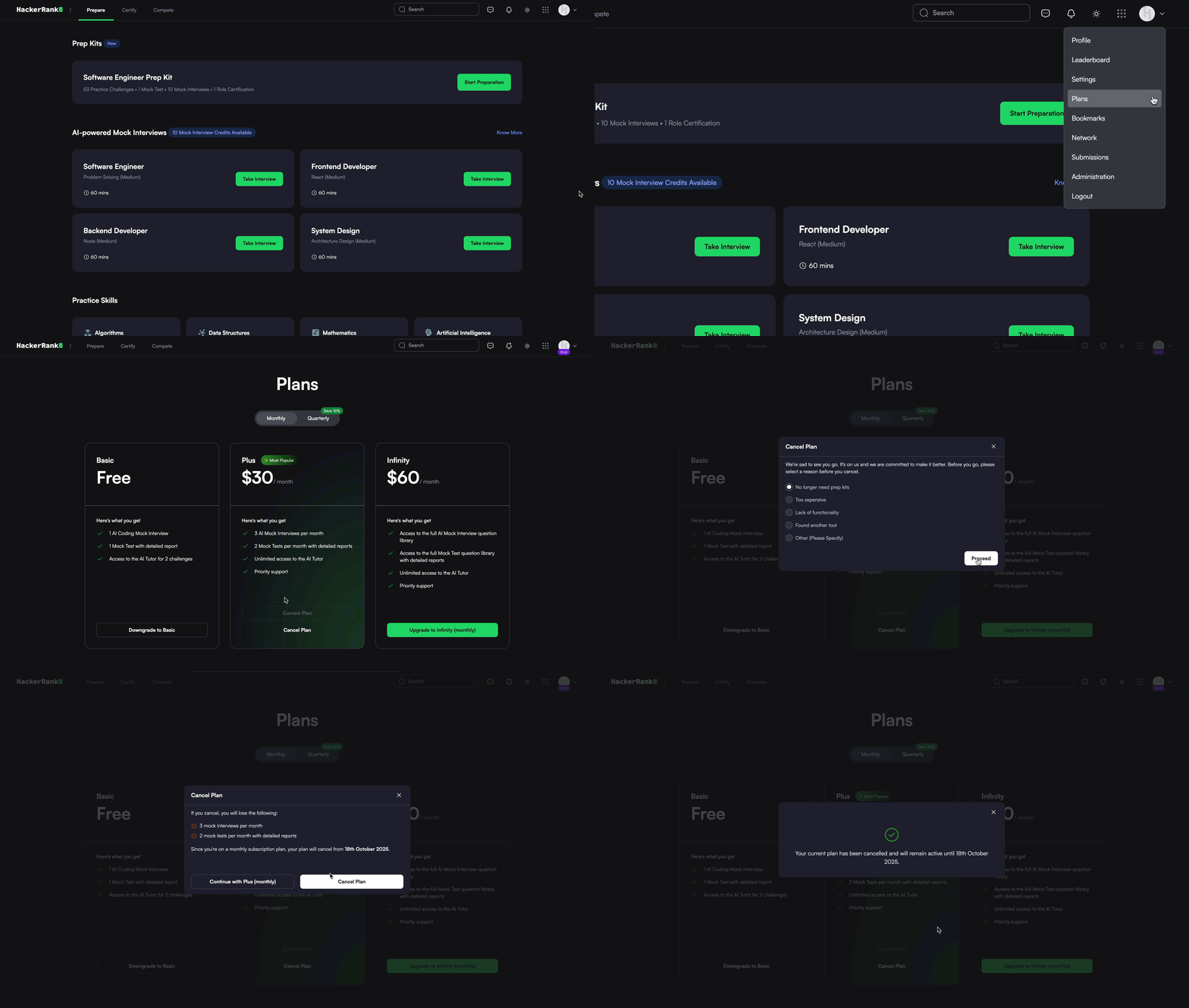
Log in to your HackerRank Community account using your credentials.
Click the profile icon in the upper-right corner.
Select Plans from the drop-down menu.
Click Cancel Plan under your current subscription.
In the confirmation dialog, select a reason for cancellation and click Proceed.
Click Cancel Plan to complete the process.
Note: HackerRank does not issue refunds for voluntary cancellations. Refunds apply only to system-related issues or severe service disruptions.